ZetoPad vs SnippetsLab vs massCode: A Thoughtful Comparison
Choosing a snippet manager should be straightforward. You need to save code, find it later, and get back to work. But the market has fragmented into enough options that choosing between them requires actual research—research most developers would rather skip to get back to coding.
This comparison focuses on the three most credible local-first options: ZetoPad, SnippetsLab, and massCode. All three store your snippets locally rather than in the cloud. All three are serious tools with real users. But they make different tradeoffs that matter depending on how you work.
The Core Philosophies
Understanding why these tools are different starts with understanding what their creators prioritized.
SnippetsLab is the veteran. Released in 2015, it’s been refined over nearly a decade of macOS development. It prioritizes native Mac feel—the kind of application that seems like it belongs in Apple’s ecosystem. The interface uses familiar macOS patterns, integrates with system features like iCloud sync and Spotlight, and works well with Mac-centric workflows like Alfred. The philosophy is “be a great Mac app.”
massCode is the community option. It’s open source, free, and cross-platform. The philosophy is accessibility: anyone should be able to use a capable snippet manager regardless of their operating system or budget. The tradeoffs this requires—primarily using Electron for cross-platform compatibility—are considered worthwhile for the democratizing effect.
ZetoPad is the performance purist. Built in 2025-2026 with Rust and GPUI, it prioritizes speed and security above all else. The philosophy is that a snippet manager should be invisible—so fast and reliable that you never think about the tool, only about the code you’re saving and retrieving. Features that might compromise that experience aren’t included.
Performance in Practice
Performance differences between these tools aren’t academic. They affect how you use the software daily and whether you actually rely on it.
Search speed is the most important metric. When you search for a snippet, how long until results appear? This sounds like a small thing, but the difference between instant and perceptible delay changes behavior. Instant search encourages use; delayed search encourages trying to remember instead of looking up.
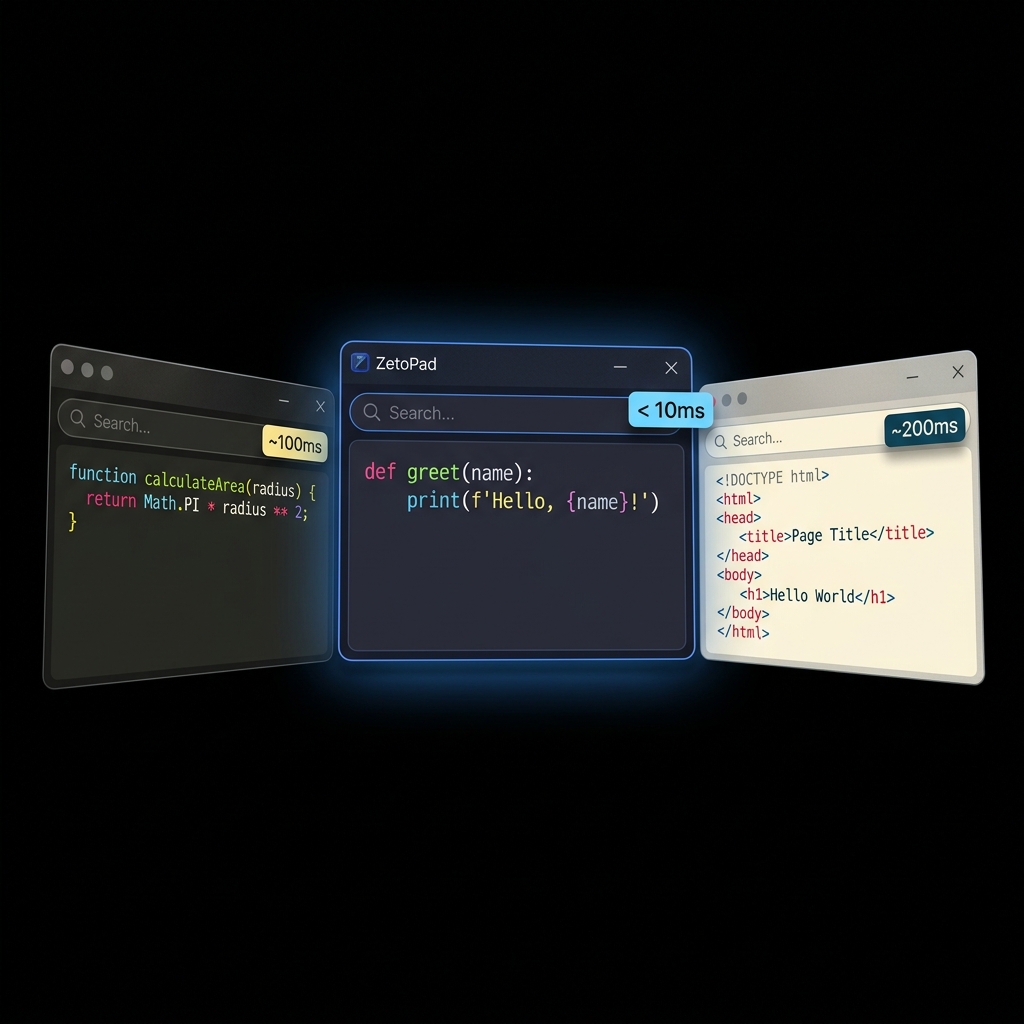
In testing with a library of 10,000 snippets, ZetoPad returns results in under 10 milliseconds. That’s fast enough to feel like autocompletion rather than search—results appearing as you type with no perceptible delay. SnippetsLab comes in around 80-100 milliseconds, which is fast but noticeable on each keystroke. massCode averages around 150-200 milliseconds, and this gap widens as collections grow larger because the underlying search isn’t optimized for scale.
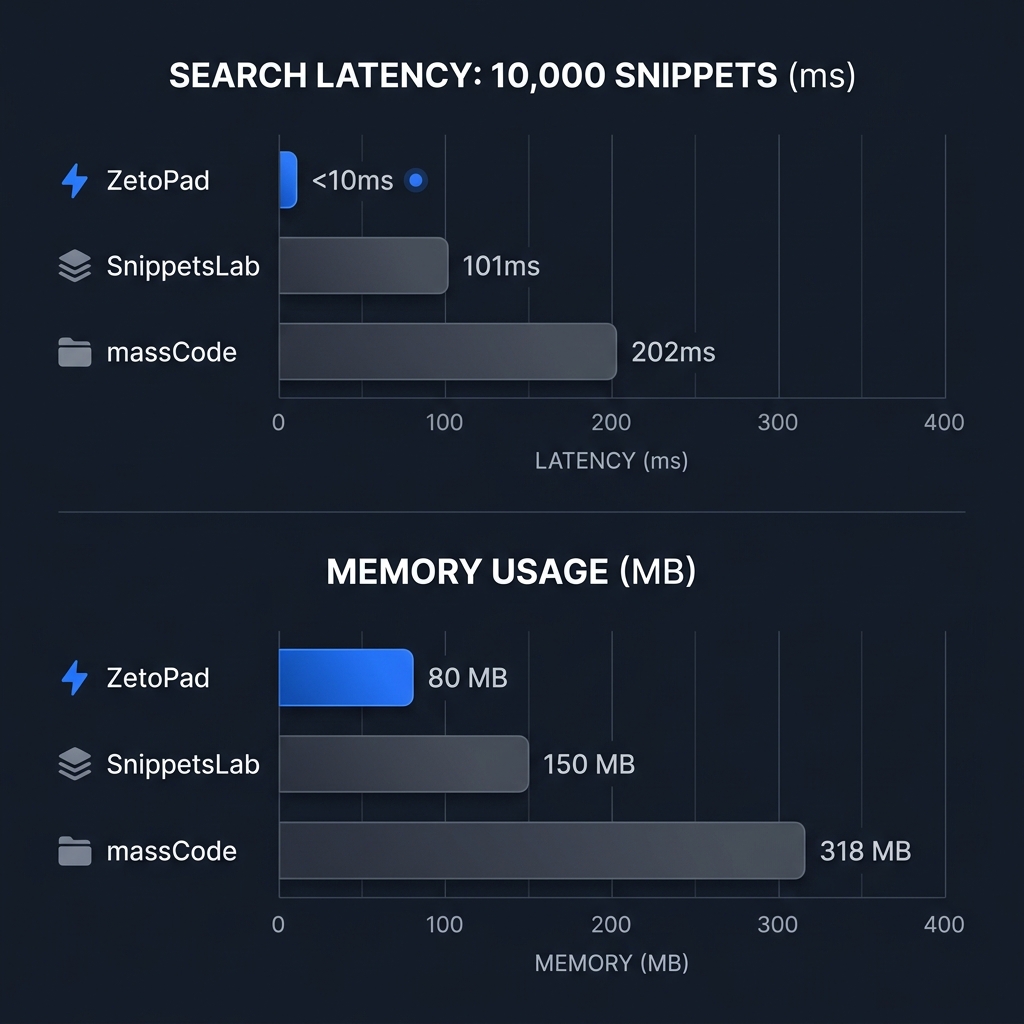
Memory usage matters on laptops where resources are constrained. ZetoPad typically uses 80-100MB, similar to a native text editor. SnippetsLab uses around 150MB, reasonable for a native Mac application with syntax highlighting. massCode uses 300MB or more, the Electron tax that accumulates across every Electron app you run.
Startup time affects whether you use the tool casually. ZetoPad starts in under a second. SnippetsLab takes about 1.5 seconds. massCode needs 2-3 seconds, long enough that you notice waiting.
These numbers aren’t meant to declare a winner—they’re context for understanding which tool fits your tolerance for performance overhead.
Feature Depth
All three tools handle the basics competently: save snippets, organize them with folders and tags, search by content or metadata, syntax highlight many languages. The differentiation is in the details.
SnippetsLab has the deepest feature set in some dimensions. Smart Groups let you create saved searches that act like dynamic folders—all Python snippets created this month, for example. The Alfred integration is polished, appealing to the many Mac developers who use Alfred extensively. Markdown support includes Mermaid diagrams and LaTeX rendering. Multiple tabs within a single snippet let you store related code together.
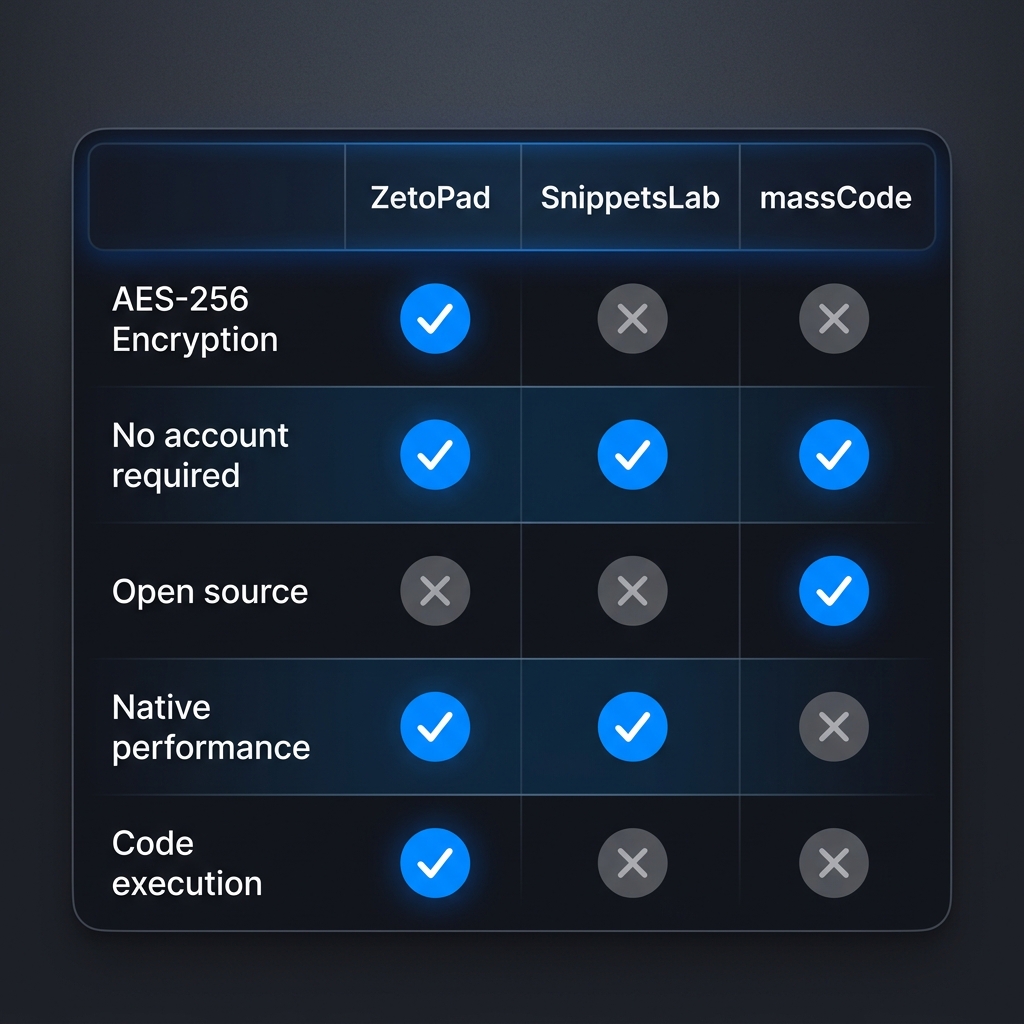
ZetoPad focuses on different capabilities. Encryption is built-in, protecting your snippet database with AES-256 when enabled. Code execution lets you run snippets directly within the app for languages like Python and JavaScript. The editor includes Vim keybindings for developers who live in modal editing. The architecture prioritizes doing fewer things exceptionally well.
massCode offers solid fundamentals. Folder organization works well. Tag support is straightforward. The interface is clean and modern. What’s notably absent is encryption, advanced editor features, or the polish that comes from either native development or extensive iteration.
Security Considerations
If you ever save anything sensitive—and most developers do, intentionally or accidentally—security matters.
ZetoPad offers genuine encryption. Your snippet database can be encrypted with SQLCipher, using AES-256. You hold the only key. There’s no password recovery because there’s no one else who could perform recovery. This is real protection, not security theater.
SnippetsLab offers no encryption. Your snippets are stored in a database that anyone with access to your disk can read. The iCloud sync, while convenient, means your snippets also exist on Apple’s servers.
massCode offers no encryption. Snippets are stored as plain JSON files, readable by any process or text editor.
For developers working with proprietary code, storing credentials, or operating under security requirements, only ZetoPad offers acceptable protection among these three options.
The Platform Question
SnippetsLab is macOS-only, with no announced plans for other platforms. If you’re committed to Mac, this is fine. If you might switch to Windows or Linux, or if you use multiple operating systems, it’s a significant limitation.
massCode runs on macOS, Windows, and Linux. Cross-platform support is its primary advantage, enabled by the Electron framework that also causes its performance limitations.
ZetoPad is currently macOS-only, with Windows and Linux versions in development. The native approach means each platform version requires significant work, but also means each version can be properly optimized rather than a lowest-common-denominator compromise.
Pricing and Sustainability
massCode is free and open source. This is clearly the most affordable option, but raises questions about long-term sustainability. Open source projects maintained by small teams often lose momentum when maintainers’ circumstances change. For a tool where you accumulate data over years, this risk matters.
SnippetsLab is a one-time purchase, currently around $15 through the Mac App Store. The price is reasonable, and the App Store distribution provides some confidence about continued availability. Development has slowed in recent years, but the tool continues to receive updates.
ZetoPad is a one-time purchase after a fourteen-day free trial. The trial is unrestricted—full features, no limits, no account required. The pricing model is sustainable for continued development without creating dependency on subscription revenue.
Making Your Choice
If you’re deeply embedded in the Mac ecosystem, use Alfred extensively, and don’t need encryption, SnippetsLab is a mature choice that’s been refined over nearly a decade. Its limitations—no other platforms, no encryption, slowing development—may not matter for your situation.
If you need cross-platform support and free is essential, massCode is the best available option. Accept the Electron overhead and lack of encryption as the cost of accessibility. Contribute to the project if you can.
If performance and security are priorities, ZetoPad offers capabilities the others can’t match. Sub-10ms search is genuinely different from 100+ms search. Real encryption is genuinely different from no encryption. These differences compound over years of use.
None of these tools is wrong. They optimize for different things, and your priorities determine the best fit. ZetoPad’s free trial makes it easy to experience the performance difference firsthand—that’s ultimately more convincing than any comparison article.