Looking for a SnippetsLab, massCode, or Pieces Alternative?

Every snippet manager seems perfect until you’ve used it for a while. The marketing pages promise effortless organization and instant search, but the reality often falls short. Search that seemed fast at first becomes sluggish as your collection grows. Features that looked innovative become annoyances you can’t disable. The tool you chose to reduce friction starts creating it.
If you’re reading this, you’ve probably experienced this pattern with your current snippet manager. Maybe you’re frustrated with SnippetsLab’s lack of encryption, or massCode’s resource consumption is draining your laptop battery, or Pieces’ cloud requirements conflict with your company’s security policies. Whatever brought you here, understanding why developers leave these tools—and what they’re looking for instead—can help you make a better choice.
Why Developers Leave SnippetsLab
SnippetsLab has been a macOS staple for years. It’s genuinely native, reasonably fast, and has features like Smart Groups that power users appreciate. For a long time, it was the default recommendation for Mac developers who wanted a proper snippet manager.
But SnippetsLab’s limitations have become more apparent as needs have evolved. The most common complaint is the lack of encryption. Your snippets are stored in a readable database, which means anyone with access to your computer—or to your backups—can read your code. This includes any API keys you saved “temporarily” and forgot about, any proprietary algorithms you wanted to reference later, any credentials that really shouldn’t be in plain text.
The iCloud sync, while convenient for Apple users, limits you to the Apple ecosystem. There’s no iOS app despite years of requests, so you can’t access snippets on your phone. Search, while acceptable for moderate collections, becomes noticeably slower as you accumulate thousands of snippets over the years.
Development has also slowed. Feature requests sit unanswered in the community forums. Updates are infrequent. For a paid application, the ongoing investment feels minimal.
Why Developers Leave massCode
massCode solves the cost problem—it’s free and open source. For developers who can’t justify spending money on a snippet manager, or who prefer open source on principle, it’s the obvious choice. The interface is clean, folder organization works well, and basic snippet management is perfectly functional.
The problems are performance and security. massCode is built on Electron, which means running a full Chrome browser and Node.js runtime just to manage text snippets. RAM usage of 300MB or more is typical. On laptops, the battery impact is noticeable. And as your snippet collection grows, search becomes progressively slower because JavaScript simply cannot match native code performance for text processing.
There’s no encryption. Your snippets live in JSON files, readable by any process on your system. The JSON format is good for portability but terrible for security.
The single-maintainer risk is also real. While the current development is active, open source projects depending on one person often stall when that person’s circumstances change. For a tool where you accumulate data over years, this creates uncomfortable uncertainty.
Why Developers Leave Pieces
Pieces represents the AI-first approach to snippet management. It captures context about where your code came from, uses machine learning to organize snippets automatically, and integrates with your development environment to surface relevant snippets as you work. The vision is compelling.
The execution creates problems for many developers. Pieces requires an account, which means your snippets sync to their cloud. Even with encryption promises, your code is on someone else’s infrastructure. The AI features that differentiate Pieces work by analyzing your code, which may violate your employer’s security policies or simply make you uncomfortable.
The interface, packed with features, overwhelms developers who just want to save and find code. The application is resource-heavy, and the subscription pricing means ongoing costs that accumulate over years. Offline functionality exists but is limited—full features require connectivity.
For developers who don’t want AI analyzing their code, who can’t use cloud storage for work code, or who prefer simplicity over feature richness, Pieces is increasingly the wrong fit.
What Developers Actually Want
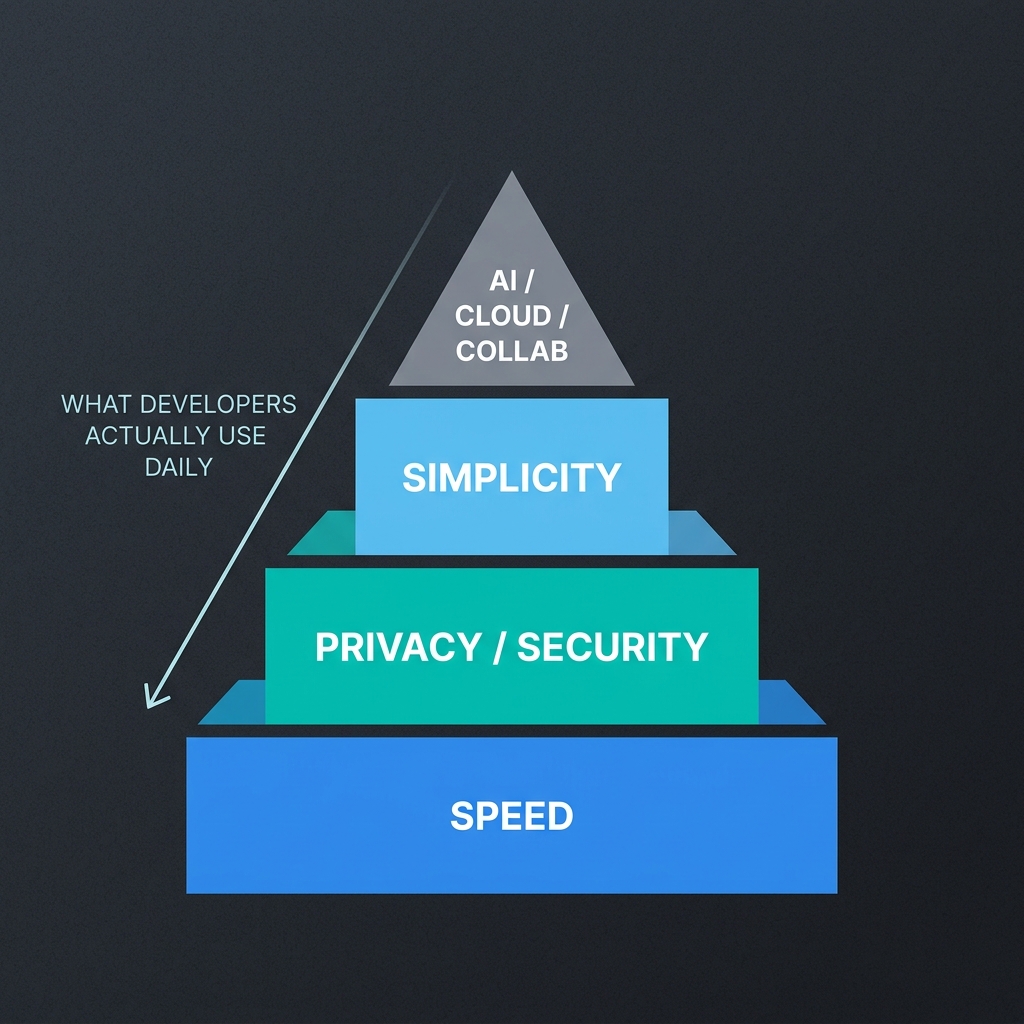
Across all these tools, a pattern emerges in what makes developers leave: performance problems, security concerns, and unnecessary complexity. The features that draw developers in initially—AI organization, cloud sync, extensive integrations—often become liabilities as priorities clarify.
What developers actually use, day after day, is much simpler: save code, find it instantly, get back to work. Everything else is secondary.
This realization drives developers toward tools that optimize for those core actions. Speed that makes search feel like memory. Privacy that means actually private, not “encrypted on our servers where we hold the key.” Simplicity that doesn’t require learning a new workflow or managing another cloud account.
Why Developers Choose ZetoPad
ZetoPad was built specifically for developers frustrated with existing options. Every design decision optimizes for the actions that matter: saving quickly, searching instantly, and protecting your code.
Search is built on a trigram index with BM25 scoring—the same techniques used by professional search engines. Results appear in under ten milliseconds, regardless of collection size. This isn’t a benchmark number that only appears in ideal conditions; it’s the consistent experience that makes the tool feel like an extension of your memory.
Privacy is absolute. ZetoPad makes zero outbound network connections. There’s no account, no cloud sync, no telemetry. Your snippets stay on your machine. When you enable encryption—which uses SQLCipher with AES-256, the same technology trusted by Signal—your snippets become mathematically unreadable without your password. Not “we promise we won’t look” unreadable. Actually unreadable.
Performance comes from native development. ZetoPad is built with Rust and GPUI, the same technology powering the Zed editor. It starts in under a second, uses a fraction of the memory Electron consumes, and never becomes sluggish regardless of how many snippets you save.
The interface is deliberately focused. Save snippets quickly with a global hotkey. Search with a single keystroke. Copy or use your code. There’s no AI to configure, no cloud to manage, no feature maze to navigate. Just a tool that does its job and stays out of the way.
Making the Switch
Migrating from other snippet managers is straightforward. ZetoPad imports from Markdown files, CSV, and plain text folders. Export your current snippets, import them into ZetoPad, and you’re running in minutes.
The fourteen-day trial is unrestricted—full features, no limits, no account required. Use it as your primary snippet manager for two weeks. If the speed difference doesn’t matter to you, if you don’t need encryption, if your current tool is actually fine, go back. No harm done.
But most developers who try instant search and real privacy don’t go back. The difference is too tangible to ignore.