Free Code Snippet Tool: Best Options in 2026

The appeal of free tools is obvious. Why pay for something when you can get it for nothing? For many categories of software, free options are genuinely good enough—sometimes even better than paid alternatives. But code snippet managers occupy a strange middle ground where the free options, while functional, often end up costing you more in time and frustration than a paid tool would cost in money.
Understanding why requires looking at how these free tools actually work, what they’re optimizing for, and what you give up by using them.
The Actually Free Options
Let’s start with tools that are genuinely free—no trial periods, no premium tiers, no upsells.
GitHub Gists remain the most common “snippet manager” for developers who don’t use a dedicated tool. They’re free, integrated with GitHub, support version control, and are shareable. For quick sharing of code examples, they work well enough. But as a personal snippet library, they fall short in ways that compound over time. Search is limited to GitHub’s web interface, which means network latency on every query. Organization is essentially non-existent—you get descriptions and filenames, but no folders, no tags, no smart grouping. Private Gists exist but require extra steps to create. And perhaps most frustratingly, there’s no offline access. If GitHub is down or your internet is out, your snippets are unreachable.
massCode is the most capable free and open-source option. It’s a proper desktop application with folders, tags, syntax highlighting, and local storage. For developers who want free above all else and are willing to accept tradeoffs, it’s the best available choice. Those tradeoffs, however, are significant. massCode is built on Electron, which means it consumes 300MB or more of RAM even when idle. Search slows noticeably as your snippet collection grows. There’s no encryption, so your snippets sit in plain JSON files readable by anyone with access to your disk. Development is primarily maintained by one person, which creates understandable concerns about long-term sustainability.
Lepton was once a popular option, essentially a desktop wrapper around GitHub Gists with a nicer interface. Unfortunately, it’s been abandoned since 2020, which means known security vulnerabilities remain unpatched. Using abandoned software for a tool that might contain sensitive code is a risk most developers shouldn’t take.
Various browser-based tools exist, storing snippets in localStorage or IndexedDB. These can work for casual use, but they’re limited by browser constraints and tied to specific machines unless you’re careful about exports.
The “Free Tier” Options
Many snippet managers offer free tiers that limit features or capacity, hoping you’ll upgrade to paid plans. Understanding these limitations matters because hitting them at an inconvenient moment is frustrating.
Cacher’s free tier limits you to 100 snippets. That sounds like a lot until you start actually using it. A developer who saves snippets regularly will hit that limit within a few months, at which point you either pay or start deleting things.
Pieces offers a free tier with AI features, but the full functionality requires a subscription. The free tier works offline for basic operations, but advanced features push you toward paid plans. There’s also the privacy consideration: Pieces’ AI features work by analyzing your code, which may not be acceptable for proprietary or sensitive codebases.
Snipit, Codeframe, and similar services follow comparable patterns—generous enough to get you started, restrictive enough to encourage upgrading.
What “Free” Really Costs
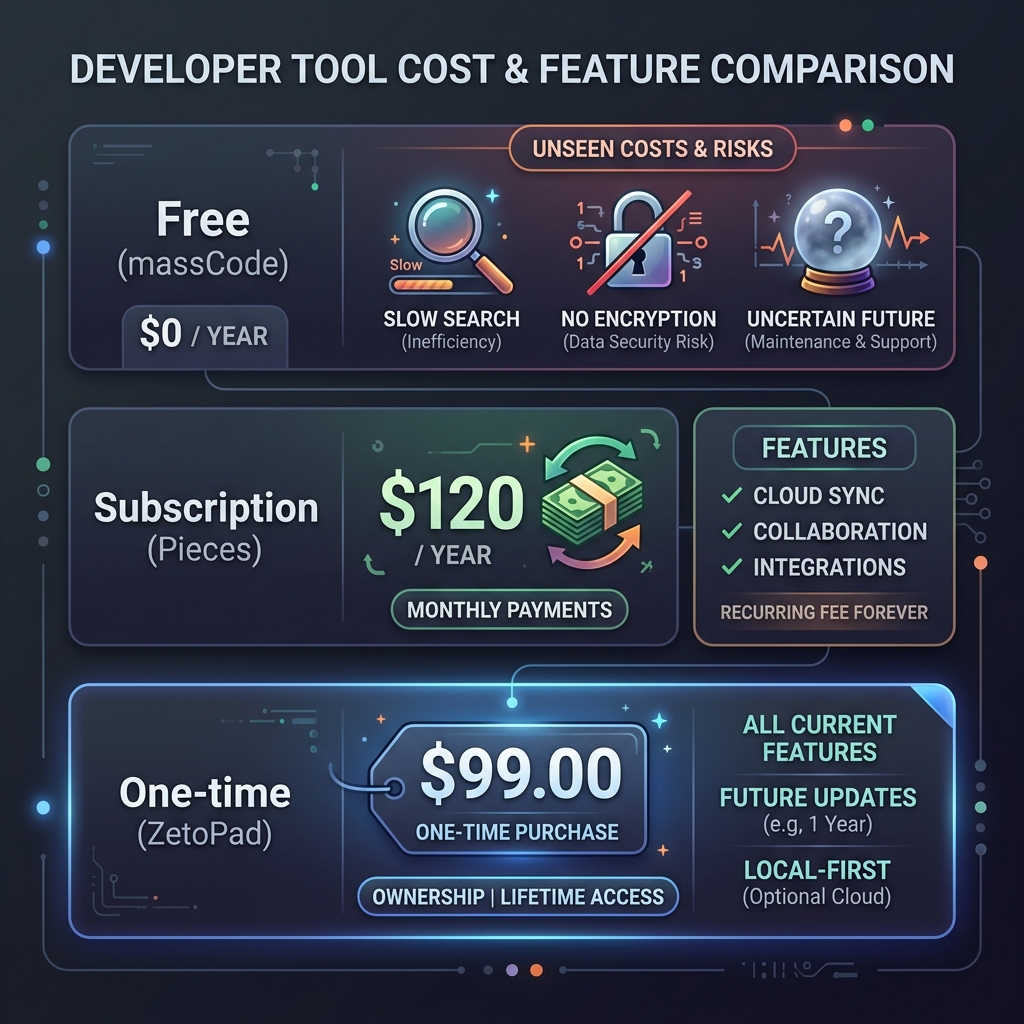
The price tag on free tools is zero dollars, but the costs show up elsewhere.
Time is the most significant hidden cost. Every second of latency in search adds up. If your free snippet manager takes even 300 milliseconds to return results—which feels pretty fast—and you search 50 times a day, that’s 15 seconds daily, over an hour per year, spent watching a loading indicator. More realistically, slower search discourages use, which means you search less, which means you rewrite code more often, which costs far more time than the search latency itself.
Privacy is another cost, though one that’s harder to quantify until something goes wrong. Free cloud-based tools have to make money somehow, and user data is often the currency. Some free tools explicitly train AI models on your snippets. Others may share usage data with advertisers. Even those with good intentions may be acquired by companies with different priorities. Your code—including any credentials or proprietary logic you saved—becomes part of someone else’s business model.
Reliability is a cost that manifests unpredictably. Free tools often have fewer resources for maintenance, support, and infrastructure. They’re more likely to experience outages, more likely to be discontinued, and more likely to have bugs that go unfixed. When your snippet manager stops working, you don’t just lose access to your snippets—you lose the accumulated productivity benefit they were providing.
When Free Makes Sense
Free tools work well in specific situations. If you’re a student or hobbyist with a limited budget, free tools are obviously better than nothing. If you have a small number of snippets and simple needs, free options may genuinely be sufficient. If you’re evaluating the category before committing to a tool, starting with free options lets you understand what you need before spending money.
But if you’re a professional developer whose time has monetary value, the calculation changes. If a paid tool saves you five minutes per week—a very conservative estimate for a good snippet manager—that’s over four hours per year. Unless your hourly rate is extremely low, a one-time purchase of a quality tool pays for itself within months.
The Case for Paying
Paid snippet managers can invest in the things that make tools genuinely good. Native development instead of Electron, which means better performance and lower resource usage. Proper encryption, which requires careful implementation and testing. Fast search engines, which require sophisticated indexing algorithms. Long-term maintenance, which requires sustainable business models.
ZetoPad exemplifies this approach. It’s built with Rust and GPUI for native performance, uses SQLCipher for genuine encryption, implements trigram indexing for sub-10ms search, and sustains development through one-time purchases rather than ads or data mining. It offers a fourteen-day free trial, so you can verify it works for you before spending anything.
The trial is genuinely unrestricted—full features, no limits, no credit card required. If after two weeks you’d rather use a free tool, you’ve lost nothing. But most developers who try fast, encrypted, offline-first snippet management find it hard to go back.
Making Your Choice
There’s no universal right answer here. Your situation, your budget, your sensitivity to privacy concerns, and your tolerance for slower tools all factor into the decision.
But if you’ve been using free snippet tools and finding them frustrating—if search is slow, if you’ve hit limitations, if you’ve wondered whether your code is really private—it might be worth trying something better. The cost of a good tool is often far less than the cost of continuing to use a bad one.