Encrypted Code Snippet Manager: Protecting Your Sensitive Code
Most developers don’t think of their snippet manager as a security-critical application. It’s just a place to save code, somewhere between a text file and a full IDE. Security considerations seem like overkill for such a simple tool.
This perception is dangerous. A typical developer’s snippet collection, accumulated over years, often contains exactly what an attacker would want: API keys saved “temporarily,” database connection strings with real credentials, authentication code with hardcoded test passwords, internal API endpoints, and proprietary algorithms. The casual nature of snippet saving—quick, informal, “I’ll clean this up later”—means these sensitive items accumulate without review.
An unencrypted snippet database is a liability. And yet, nearly every snippet manager stores your code in plain text.
Why Encryption Matters for Snippets
Consider the threat model. Your laptop gets stolen at a coffee shop. Your backup drive is misplaced. Someone gains access to your cloud storage account. Your machine is compromised by malware. In any of these scenarios, an unencrypted snippet database is immediately readable.
The contents of that database might include everything needed to access production systems. API keys for services with billing attached. Credentials for internal tools. Code that reveals architectural details an attacker could exploit. Even old, “invalid” credentials often still work because developers overestimate how often they actually rotate secrets.
“I don’t save sensitive things” is what everyone says. But memory is imperfect, and the nature of snippets is that you save them quickly and forget what you saved. When you actually audit your snippet collection—something most developers have never done—the sensitive items that accumulated are often surprising.
The Encryption Landscape
Most snippet managers offer no encryption at all. massCode stores snippets as plain JSON files. SnippetsLab uses an unencrypted database. Plain text notes apps handle code no differently from grocery lists.
Cloud-based snippet managers like Pieces and Cacher offer “encryption at rest,” but this term is misleading in context. Encryption at rest means the data is encrypted on their servers’ disks. However, the service provider holds the encryption keys. The data is decrypted when you access it through their app or website. Their employees can access it. Their systems can process it. Legal demands can compel them to decrypt it.
This is better than nothing, but it’s not protecting you from the most likely threats. If you’re concerned about the service provider, their employees, hackers who breach their systems, or governments with legal authority, server-side encryption doesn’t help. The server can always read your data.
True encryption means you hold the key. Nobody—not the software developer, not a hosting provider, not law enforcement—can read your data without the password you chose. If you forget the password, the data is unrecoverable, because there’s no backdoor. This is the only encryption that actually protects against determined adversaries.
How ZetoPad Handles Encryption
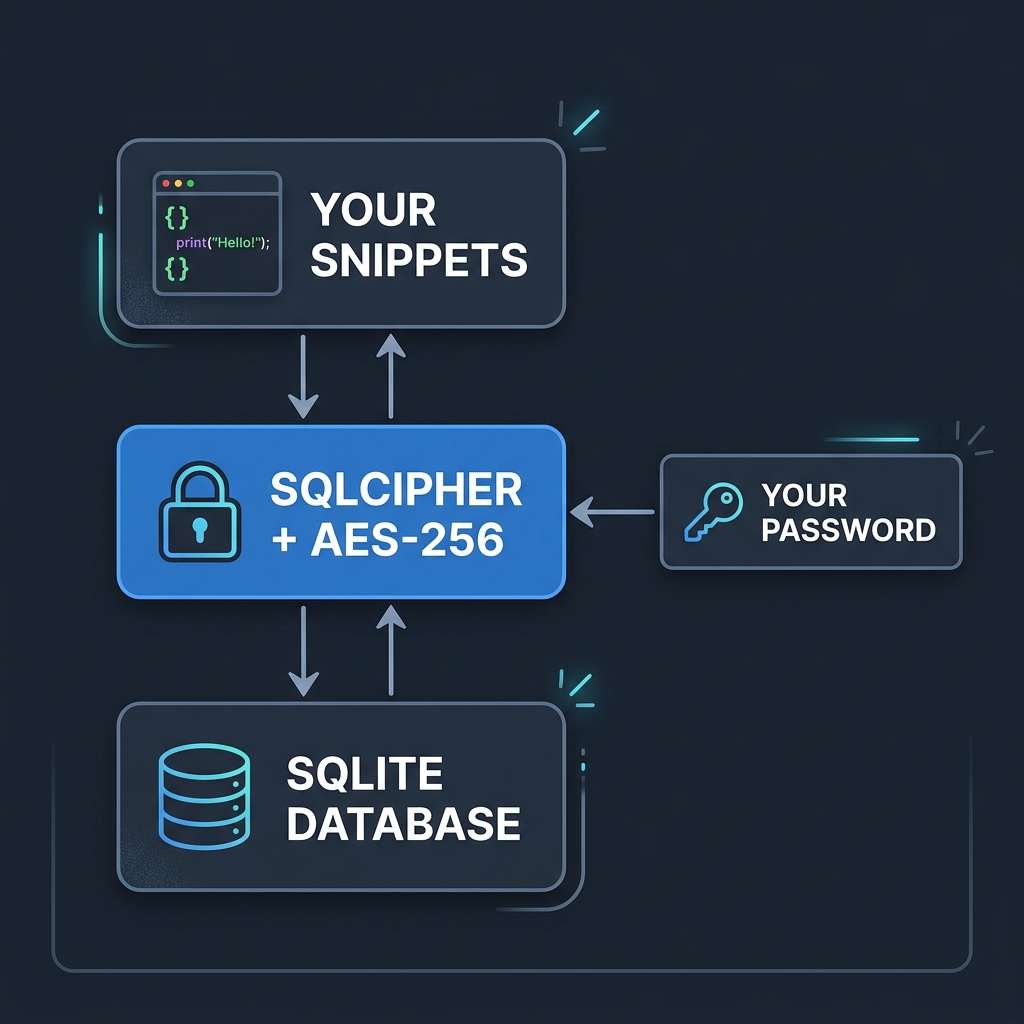
ZetoPad offers optional database encryption using SQLCipher, an open-source encrypted SQLite extension. When enabled, your entire snippet database—all content, all metadata, all indexes—is encrypted with AES-256.
AES-256 is the encryption standard used by governments for classified information. With a strong password, it’s computationally infeasible to brute-force. The heat death of the universe arrives before all possible keys are tried.
Key derivation uses PBKDF2 with SHA-512 and a high iteration count. This turns your password into an encryption key in a way that’s deliberately slow, making password guessing attacks impractical even with specialized hardware.
Critically, ZetoPad never transmits your password anywhere. There’s no account, no server to authenticate against, no “forgot password” mechanism. The password is used locally to derive the encryption key. If you forget it, there’s no recovery path—and that’s the point. No recovery means no one else can recover it either.
The User Experience
Encryption does add some complexity, and it’s worth being honest about the tradeoffs.
When you enable encryption, you’ll enter your password each time you open ZetoPad. There’s no “remember me” option that would weaken the protection. On macOS, you can store the password in the system keychain, which means you’ll authenticate with Touch ID instead of typing—this is convenient while maintaining security.
There’s a performance impact, though modest. Encryption and decryption add CPU overhead to database operations. On modern hardware, this is barely noticeable: a few extra milliseconds on operations that were already fast. Search still completes well under 100 milliseconds even with encryption enabled.
The password cannot be recovered. This is intentional, but it requires taking password management seriously. Use a password manager. Write the password down and store it somewhere secure. Don’t choose something you might forget in a year when you reinstall your system.
Who Needs Encryption
Some developers clearly need encrypted snippet storage. Those handling credentials, working with proprietary code under NDA, operating in regulated industries (finance, healthcare, government), or processing personally identifiable information should consider encryption mandatory. For these users, unencrypted snippets represent an unacceptable risk.
Others might not need it but benefit from it anyway. Encryption removes the need to think about what you’re saving. With an encrypted database, you can save freely without worrying whether a particular snippet is sensitive enough to warrant caution. The mental overhead of evaluating each save disappears.
Full-disk encryption (FileVault on macOS, BitLocker on Windows) provides baseline protection, but it’s not sufficient on its own. Full-disk encryption protects when your machine is powered off. Once you log in, everything is decrypted. If someone accesses your running machine—or if malware does—your snippets are exposed. Per-application encryption adds another layer: even if your session is compromised, the snippet database remains protected until you specifically unlock it.
Enabling Encryption
In ZetoPad, encryption is enabled through Settings → Security. You choose a password, confirm it, and the database is encrypted. This works on new databases and can be applied to existing snippet collections.
Changing the password later requires the current password. Removing encryption entirely requires the current password. There’s no backdoor for “if you forgot your password”—because such backdoors are vulnerabilities.
Backups of an encrypted database are automatically encrypted. You can copy the database file anywhere—cloud storage, external drives, anywhere—and it remains unreadable without your password. This makes secure backup trivial: just copy the file.
Taking Security Seriously
Your snippet collection probably contains more sensitive material than you realize. The casual way we all save code, intending to clean it up later, creates a security exposure that grows over years.
ZetoPad offers proper encryption: AES-256, local-only, you hold the only key. Combined with offline-only operation and no account requirements, it’s a security posture that actually protects rather than just checking compliance boxes.
The fourteen-day trial includes full encryption functionality. Try it, enable encryption, and work with the confidence that your snippets are genuinely protected.