Code Snippet Manager for Developers: The Ultimate Guide

Every experienced developer has a confession to make: somewhere in their career, they’ve spent an embarrassing amount of time searching for code they know they’ve written before. Maybe it was a particularly elegant solution to a tricky problem, a utility function that handled edge cases perfectly, or just a command-line incantation they can never quite remember. The code exists—it’s just scattered across old projects, forgotten Gists, Slack messages to themselves, and that one text file on the desktop named “temp.txt” that’s been there for three years.
This is the problem code snippet managers exist to solve. And yet, despite having access to these tools, most developers either don’t use them or use them so ineffectively that they might as well not bother. Understanding why requires looking at what actually makes a snippet manager valuable—and what makes developers abandon them.
The Hidden Cost of Not Having a System
The obvious cost of disorganized snippets is time spent searching. But the real cost runs deeper than that. Every time you rewrite code you’ve written before, you’re not just wasting the time it takes to write it—you’re also missing the opportunity to use the improved version you refined last time. You’re potentially reintroducing bugs you already fixed. And you’re adding cognitive load to a task that should be automatic.
There’s also an invisible tax on your willingness to experiment. When you know that any clever solution you create will likely be lost within a few months, you’re subtly discouraged from investing time in elegant code. Why craft the perfect regex when you’ll just have to figure it out again next time? This mindset slowly degrades code quality across your entire career.
Teams suffer even more. When useful code lives only in individual developers’ memories (or their private snippet files), institutional knowledge walks out the door every time someone leaves. New team members spend weeks reinventing solutions that already exist, documented nowhere except in a former colleague’s personal notes.
What Makes Developers Actually Use a Snippet Manager
The graveyard of abandoned productivity tools is vast, and snippet managers have contributed their fair share of corpses. Understanding why developers abandon these tools is crucial to finding one that actually sticks.
The first killer is friction in saving. If it takes more than a few seconds to save a snippet—if you need to switch applications, fill out forms, choose categories from dropdown menus—you won’t do it consistently. You’ll save snippets when you’re feeling organized, which is almost never when you’re in the middle of actual work. The tool needs to be nearly invisible when saving.
The second killer is friction in retrieving. This is where most snippet managers fail catastrophically. If search takes more than a second, developers start doing mental calculations: “Is it faster to search for this or just write it again?” Once you start asking that question, the tool has already lost. Search needs to be instant—not “fast,” but genuinely instant, appearing as you type.
The third killer is organizational overhead. Tools that require you to maintain elaborate folder hierarchies or tagging systems become a second job. The best snippet managers handle organization automatically or make it optional, trusting search to find things regardless of how well-organized they are.
Choosing the Right Approach
Snippet managers broadly fall into three categories, each with different tradeoffs.
Plain text files in a folder have the advantage of simplicity and universal compatibility. Your snippets are just files, searchable with grep, editable with any text editor, and trivially backed up. The downside is that search becomes slow as your collection grows, and you lose features like syntax highlighting in the file browser and smart search ranking.
Note-taking apps like Obsidian or Notion can work reasonably well for snippets, especially if you’re already using them for other purposes. The advantage is consolidation—one tool for all your notes and code. The disadvantage is that these tools aren’t optimized for code. Search doesn’t understand programming languages, syntax highlighting may be limited, and the experience of quickly grabbing a code block is never quite as smooth as a dedicated tool.
Dedicated snippet managers exist specifically for this purpose, and when well-designed, they offer the best experience. Fast code-aware search, proper syntax highlighting, organization features that actually make sense for code, and workflows optimized for the save-search-use cycle that developers actually need. The tradeoff is adding another tool to your stack.
The Case for a Dedicated Tool
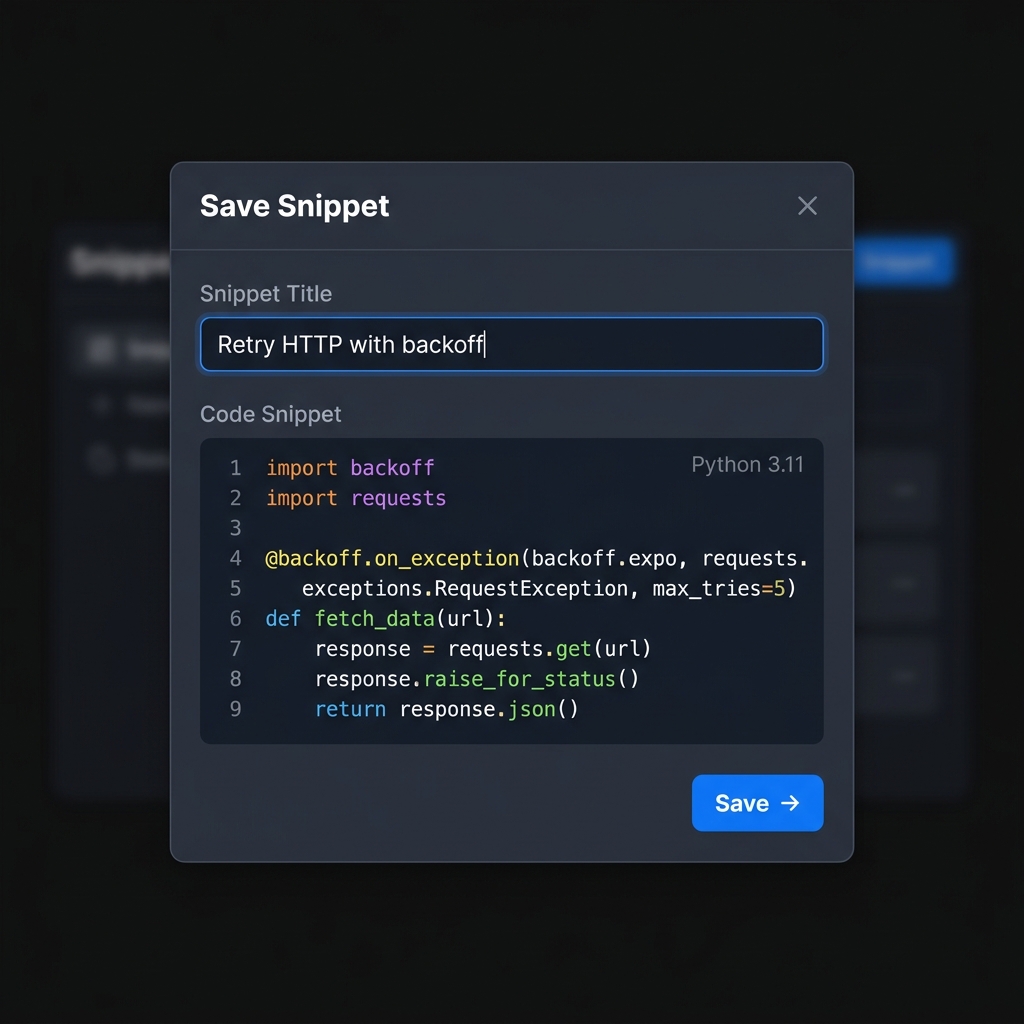
For developers who regularly write and reuse code—which is to say, all professional developers—a dedicated snippet manager pays for itself quickly. The key is finding one that respects how developers actually work.
ZetoPad represents a new generation of snippet managers built with this philosophy. Rather than starting with features and hoping developers adapt their workflows, it started with the workflows and built features to support them.
The save experience is streamlined to the point of being nearly invisible. Global hotkey, paste or type, add a quick title if you want, done. No mandatory categorization, no required tags, no multi-step wizards. You can add organization later if you want, but the tool doesn’t block you from saving something quickly.
Search is built on the understanding that developers will search far more often than they organize. ZetoPad’s trigram-based search engine returns results in under ten milliseconds, making search feel like an extension of memory rather than a query to an external system. You can search by code content, by title, by tags if you’ve added them, or by natural language descriptions. The tool doesn’t punish you for imperfect organization.
The tool runs entirely offline, which matters more than many developers initially realize. No account means no friction in getting started. No cloud means no latency in search. No internet requirement means your snippets work on planes, in coffee shops with bad WiFi, and during the next major cloud outage. It also means your code—including any sensitive snippets you really shouldn’t have saved but did anyway—never leaves your machine.
Building Your Snippet Workflow
The best snippet workflow is one you’ll actually use, which means it needs to be almost automatic. Here’s a pattern that works for many developers.
When you write something you might want again, save it immediately. Don’t wait until you’re “feeling organized” or have time to properly categorize it. Just save it with a quick title that describes what it does. Even a title like “that auth thing with JWT” is better than nothing—you’ll probably search for “auth” or “JWT” anyway.
Don’t worry about organization at first. Just accumulate snippets. After a few weeks, you’ll start noticing patterns in what you search for, and you can add tags or folders retroactively if they’d help. Some developers never organize beyond basic language groupings; others develop elaborate systems. Both approaches work fine if search is fast enough.
Trust search over memory. The goal isn’t to remember where you put things—it’s to describe what you’re looking for and get there immediately. If you find yourself trying to remember which folder something is in, that’s a sign your organizational system is fighting against you rather than helping.
Regularly use what you save. A snippet manager isn’t an archive; it’s a working tool. The more you use your saved snippets, the more you’ll save, and the more valuable the collection becomes. This creates a virtuous cycle that makes the tool increasingly indispensable.
Getting Started
If you’ve never used a dedicated snippet manager, or if you’ve tried them and given up, it might be time for another look. The tools have gotten significantly better, and the difference between a well-designed snippet manager and a poorly-designed one is night and day.
ZetoPad offers a free trial, no account required. Download it, save a few snippets, try searching for them, and see if the experience matches what you need. For many developers, the moment they experience truly instant search, they wonder how they ever worked without it.