Best Snippet Manager for macOS in 2026

Mac developers have more snippet manager options than users of any other platform. The Mac’s long history as a developer-friendly environment has attracted tool makers for decades, and the snippet manager category is no exception. But more options doesn’t mean easier choices—it means more homework before you can get back to actual coding.
This guide cuts through the options to help you find the right tool. The “best” snippet manager doesn’t exist in absolute terms; it exists relative to what you need. Understanding your priorities—and how different tools serve them—leads to better choices than reading feature lists.
Why Native Matters on Mac
Before comparing specific tools, it’s worth understanding a distinction that significantly affects the Mac experience: native vs. Electron applications.
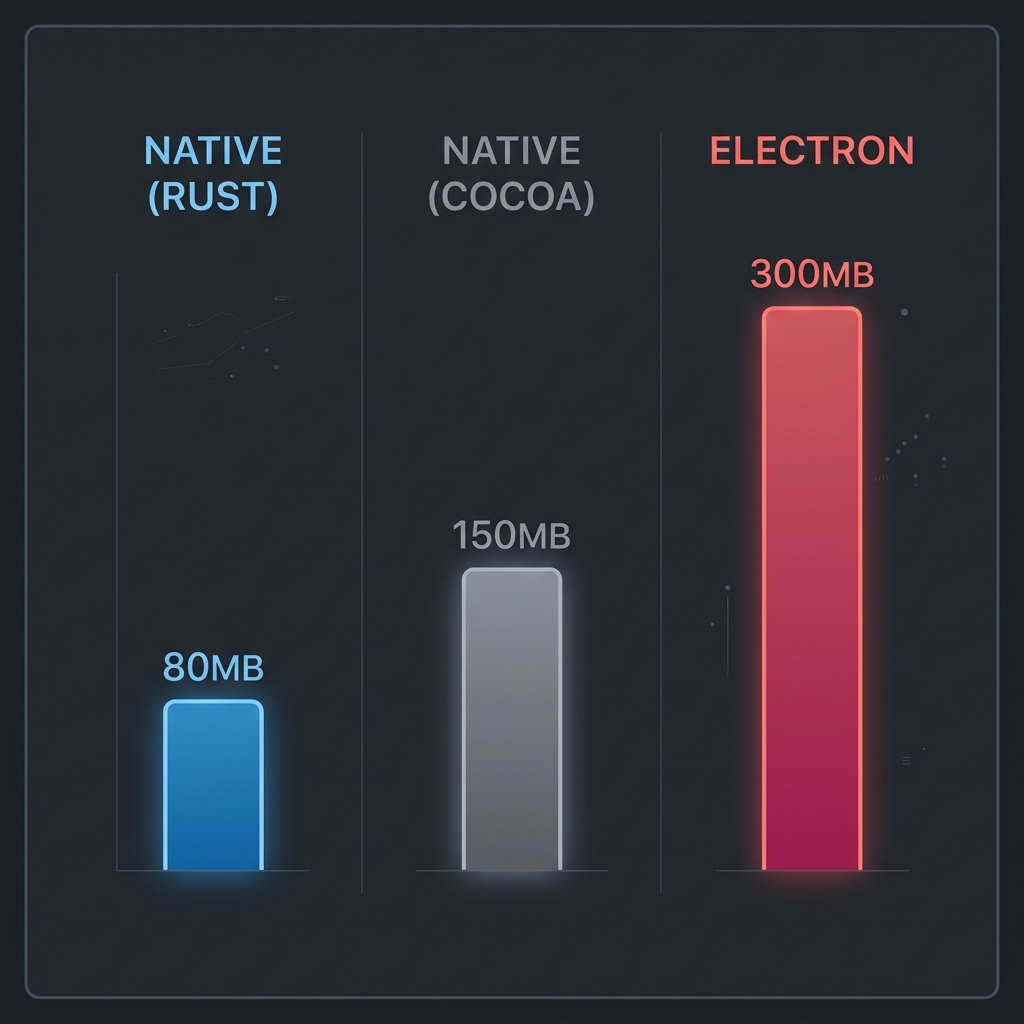
Native Mac applications are built specifically for macOS, using Apple’s frameworks and design patterns. They integrate with the operating system naturally: proper Dark Mode support, system keyboard shortcuts, services menu integration, notification center, Spotlight search. They use memory efficiently because they’re not running an entire web browser as their foundation. They start quickly because there’s no JavaScript runtime to initialize.
Electron applications are essentially web pages packaged as desktop apps. They achieve cross-platform compatibility by bundling Chrome and Node.js, which means they behave similarly on Mac, Windows, and Linux. The tradeoff is resource consumption—typically 300MB or more of RAM—and an experience that never quite feels like it belongs on your Mac.
For developers who spend all day in macOS, native applications feel like home. For developers who switch between platforms frequently, Electron applications offer consistency, even if that consistency comes at a performance cost.
The Native Options
SnippetsLab has been the default recommendation for Mac snippet management for years. Built with Cocoa, it feels like it belongs in the macOS ecosystem. The interface follows Apple’s Human Interface Guidelines. Keyboard shortcuts match Mac conventions. iCloud sync works with your Apple ID. Alfred integration appeals to the Mac power user crowd.
The downsides have accumulated over nearly a decade. There’s no encryption, so your snippets are readable by anyone with disk access. Development has slowed, with feature requests sitting unanswered for years. There’s no iOS companion app despite persistent requests. And search performance, while acceptable for moderate collections, becomes sluggish as snippet libraries grow into the thousands.
ZetoPad is the newer native option, built in 2025-2026 with Rust and GPUI (the framework from the Zed editor). It takes a different approach to “native”—not using Apple’s Cocoa frameworks, but compiling to machine code that runs natively without interpreters or VMs. The result is performance that matches or exceeds traditional native apps: sub-10ms search, under 100MB memory usage, instant startup.
Where ZetoPad distinguishes itself is in capabilities other Mac tools don’t offer. Encryption is built-in, using SQLCipher with AES-256. The search engine uses professional-grade trigram indexing rather than basic text search. Code execution lets you run snippets directly. The privacy stance is absolute: no network connections, no account, no telemetry.
The limitation is ecosystem integration. ZetoPad doesn’t hook into macOS services as deeply as SnippetsLab. There’s no iCloud sync (by design—sync happens through file copying). Spotlight integration isn’t present yet. If your workflow depends on these macOS-specific features, they’re genuinely absent.
Dash deserves mention as a hybrid: primarily a documentation browser with snippet management as a secondary feature. If you want offline API docs and snippets in one tool, Dash makes sense. If snippets are your primary concern, it’s not specialized enough.
The Cross-Platform Option
massCode is the notable Electron-based alternative. It’s free, open source, and runs on Mac, Windows, and Linux. For developers who want zero cost or need cross-platform parity, it’s the best available choice.
The Mac experience, however, is compromised. The 300MB RAM usage is standard for Electron but jarring compared to native apps. The interface follows its own design language rather than macOS conventions. Startup takes several seconds. Search slows noticeably with large collections.
None of this makes massCode bad—it makes it Electron. If you’re comfortable with that tradeoff, massCode offers genuine capability for free. If native Mac experience matters to you, it’s the wrong tool regardless of price.
The Cloud-Connected Options
Pieces and Cacher represent the cloud-first approach on Mac. Both offer Mac apps that connect to their cloud services, providing sync, AI features (Pieces), or team collaboration (Cacher).
For some workflows, cloud features are valuable. If you genuinely need your snippets on multiple machines with automatic sync, these tools provide it. If you want AI-powered organization, Pieces offers it. If your team shares snippet libraries, Cacher supports that.
But the cloud architecture imposes constraints that matter on Mac just as much as other platforms. Network latency means slower search than local tools. Required accounts mean your snippets live on someone else’s servers. Offline functionality is limited or absent. And macOS-specific integrations are typically weaker because the same code runs on multiple platforms.
Matching Tools to Priorities
The right choice depends on what you prioritize. Let’s consider some common Mac developer profiles.
The classic Mac power user works almost exclusively on Mac, uses Alfred or Raycast extensively, appreciates native design, and wants tools that feel like they belong. For this profile, SnippetsLab has traditionally been the answer. Its Alfred integration is polished, its Mac conventions are correct, and its decade of refinement shows. If you don’t need encryption and your snippet collection is moderate-sized, SnippetsLab remains solid.
The performance-focused developer cares more about speed than integration, wants search to feel instant regardless of collection size, and may work with sensitive code requiring encryption. ZetoPad is designed for this profile. Sub-10ms search is noticeably faster than any alternative. Encryption is available and real. The experience is optimized for the save-search-use cycle that makes snippet managers valuable.
The budget-conscious or open source advocate wants capable tools without payment, prefers open source for philosophical reasons, or needs to use the same tool across Mac, Windows, and Linux. massCode is the answer here, with the understanding that native Mac experience isn’t the priority.
The team-oriented developer shares snippet libraries with colleagues, values collaboration features, and is comfortable with cloud storage. Cacher focuses on this use case. The Mac app is functional rather than exceptional, but team features are the point.
The AI enthusiast wants smart organization, semantic search, and integration with AI coding assistants. Pieces offers the most AI capability. Whether you want AI analyzing your code is a personal decision about privacy and dependency.
Making Your Choice
The snippet manager you choose will hold years of accumulated code—solutions you’re proud of, patterns you’ll reference repeatedly, maybe some sensitive material you shouldn’t have saved but did. It’s worth choosing deliberately rather than defaulting to whatever appears first in a search.
If you’re unsure where your priorities lie, try a few options. ZetoPad offers a fourteen-day trial with no limitations and no account required. SnippetsLab doesn’t have a trial, but the Mac App Store offers refunds within a window. massCode is free to try indefinitely. Even Pieces and Cacher offer free tiers.
A week with any tool reveals whether it fits how you actually work—better than any comparison article can. Start with the tool that seems most aligned with your priorities, use it seriously for a week, and see how it feels.